Title here
Summary here
March 9, 2026 by Victor M. Alvarez3 minutes
In team environments where multiple analysts contribute to a shared YARA rule corpus, maintaining consistency in rule metadata is of utter importance. Many YARA rules across the industry already adhere to established metadata conventions, yet often lack the appropriate tools for enforcing these conventions during rule creation. Ensuring that every rule includes essential metadata—such as author, version, or description—and that this metadata adheres to predefined types, is crucial for rule management, automation, and overall maintainability.
This is where the YARA Language Server, offers a powerful solution: metadata validation.
The YARA Language Server introduces a metadataValidation configuration that allows teams to define and enforce strict metadata standards directly within the editor. This feature transforms metadata consistency from a manual review process into an automated, real-time feedback loop for rule developers.
The metadataValidation setting is configured in your Visual Studio Code settings.json file. It’s an array of objects,
where each object specifies validation rules for a particular metadata field.
Here’s an example configuration:
"YARA.metadataValidation": [
  {
    "identifier": "author",
    "required": true,
    "type": "string"
  },
  {
    "identifier": "version",
    "required": true,
    "type": "integer"
  },
  {
    "identifier": "last_reviewed",
    "required": false,
    "type": "string"
  },
  {
    "identifier": "status",
    "required": true,
    "type": "string"
  },
  {
    "identifier": "confidence",
    "required": false,
    "type": "float"
  }
]
You can easily configure these settings in Visual Studio Code. Access the settings by navigating to Code > Settings > Settings and searching for “yara”. This will bring up the configuration options where you can define your metadata validation rules.
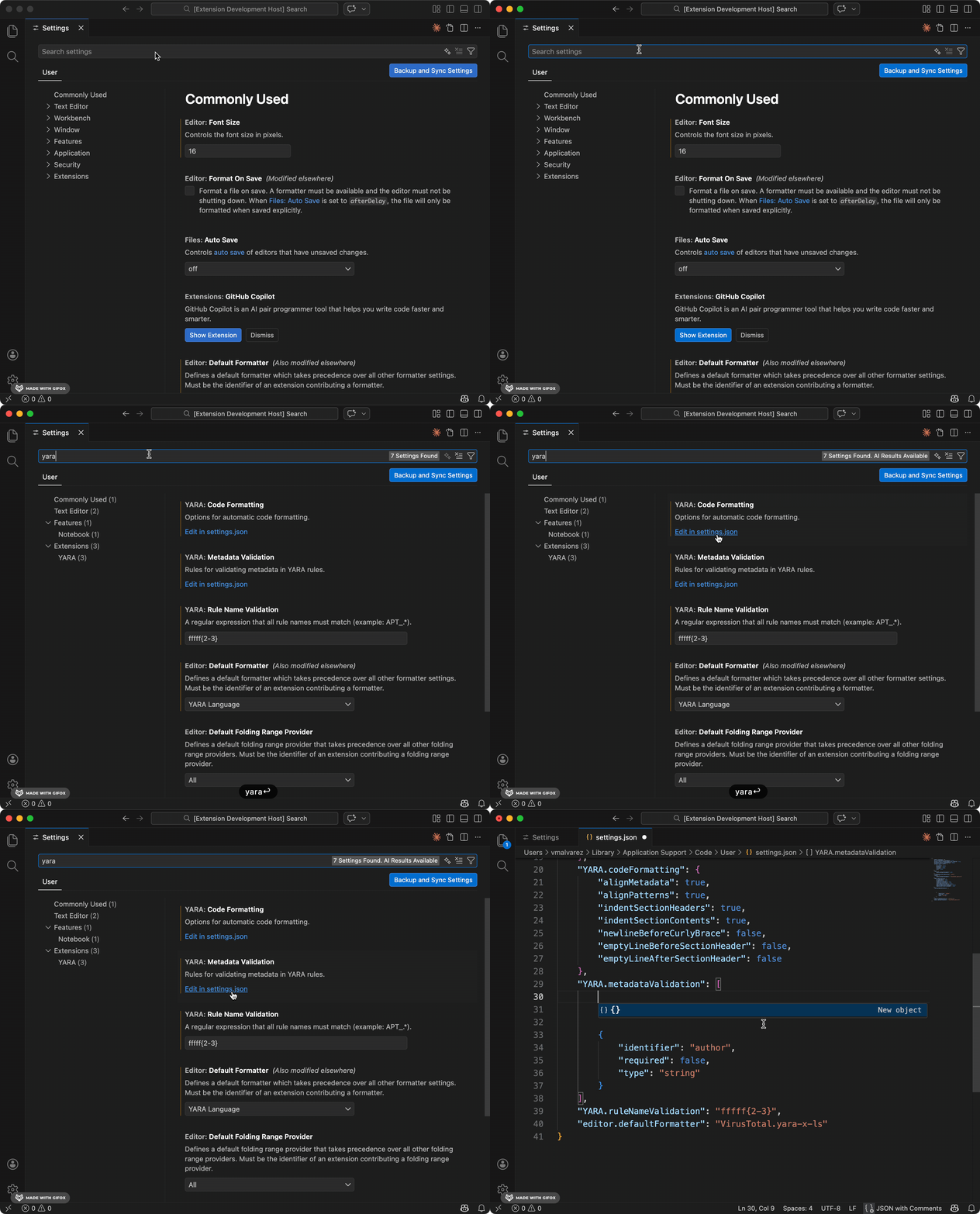
Let’s break down the properties for each validation object. The identifier property is a required string that sets
the name of the metadata field you want to validate (e.g., author, version). The required property is an optional
boolean that, if set to true, will cause the language server to issue a warning if the metadata field is missing from
a rule. It defaults to false. Finally, the type property is an optional string that specifies the expected data
type for the metadata value. Valid options are "string", "integer", "float", and "bool". If the value in the
YARA rule does not match the specified type, a warning will be generated.
With this configuration in place, the Language Server provides immediate feedback in the Visual Studio Code editor
as soon as a YARA rule is written or modified. For example, if an author or version field (marked as required: true)
is omitted, a warning for missing required fields will appear. If version is provided as a string instead of an
integer, a type mismatch warning will be shown. This real-time feedback allows developers to see issues as they type,
empowering them to correct problems instantly before committing their code.
Implementing metadata validation brings significant advantages. It enhances rule quality by ensuring all rules adhere to a common standard of completeness and correctness. It also improves collaboration by providing a clear, automated guide for all team members on what metadata is expected, which reduces ambiguity and fosters consistent contributions.
Furthermore, this feature simplifies automation, as consistent metadata enables more reliable parsing and automation of rule management tasks, such as generating reports or categorizing rules. It also accelerates the onboarding of new analysts, who can quickly understand the required metadata format without extensive manual guidance. By catching metadata issues at the development stage, the risk of deploying malformed or incomplete rules is significantly lowered, thereby reducing errors.
Embrace consistent metadata and elevate your YARA rule management today!